son zamanlarda pişirdiğimiz yeni özellikler. the new features we've been cooking.
fiş yazıcısı, baştan yazılmış bir raporlar sayfası, uygulama dışına çıkan bildirimler, son kullanma tarihi hatırlatmaları ve barkodsuz ürünlere barkod — hepsi son birkaç ayda posi'ye girdi. receipt printing, a rebuilt reports screen, notifications that leave the app, best-before reminders and barcodes for unbarcoded products — all landed in posi over the last few months.
temmuzda para üstü hesaplayıcıyı anlattığımızdan beri posi'ye epey şey girdi. hepsi aynı yerden çıktı: kasada duran insanların bize yazdıkları. sırayla anlatalım — her biri için ekranın nasıl göründüğünü de koyduk.a lot has gone into posi since we wrote about the change calculator in july. all of it came from the same place: the people standing at a till, writing to us. here's each one, with a picture of what it actually looks like.
-
posi+
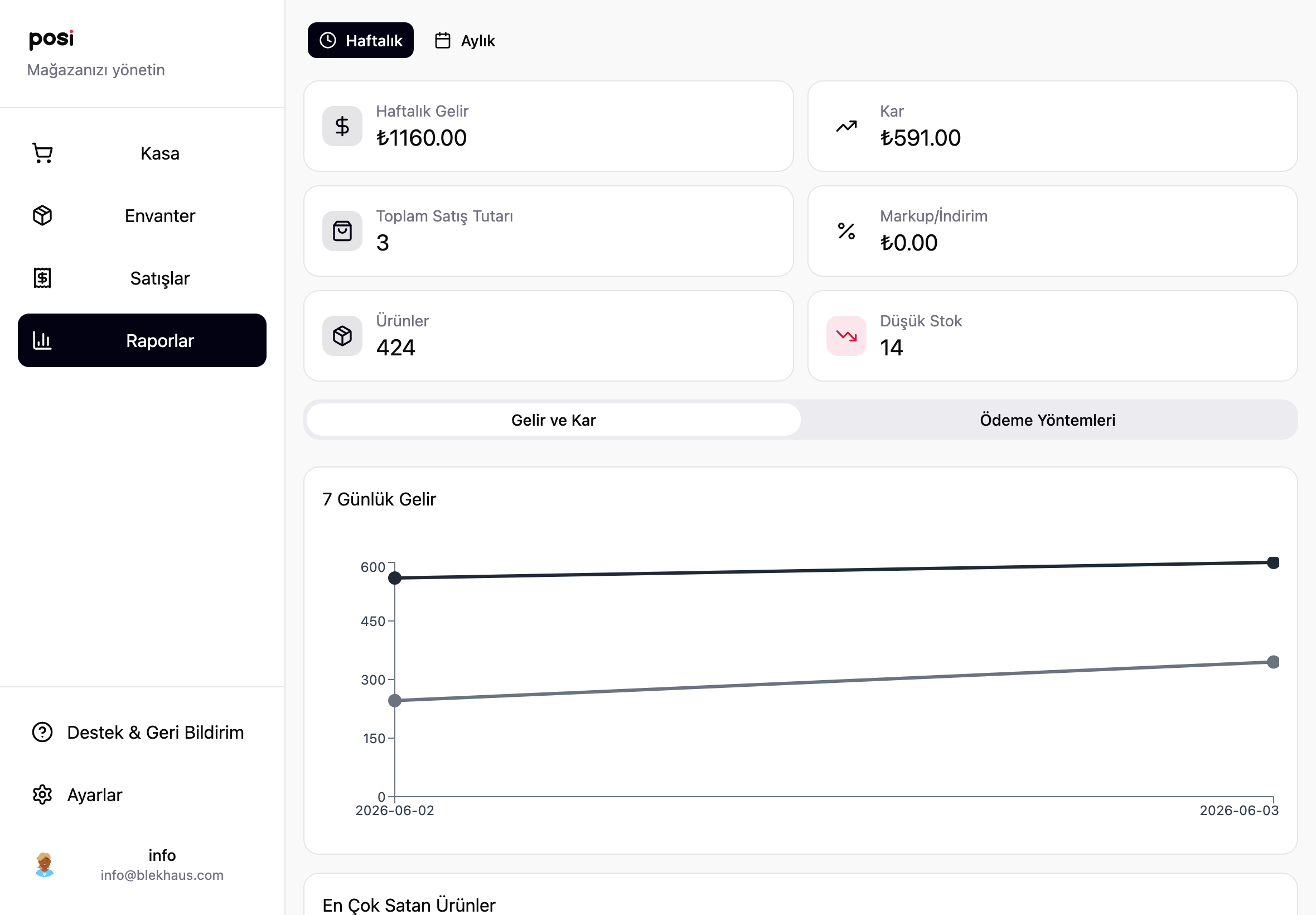
Yeni Raporlar sayfasıNew Reports screen
ciro, kâr, satış adedi ve sepet ortalaması — dönem karşılaştırmasıyla.revenue, profit, sales count and average basket — with a period comparison.
-
posi+
USB fiş yazıcısıUSB receipt printing
ucuz bir termal yazıcı takın, satıştan sonra tek dokunuşla fiş çıkarın.plug in a cheap thermal printer and print a receipt in one tap.
-
herkese açıkeveryone
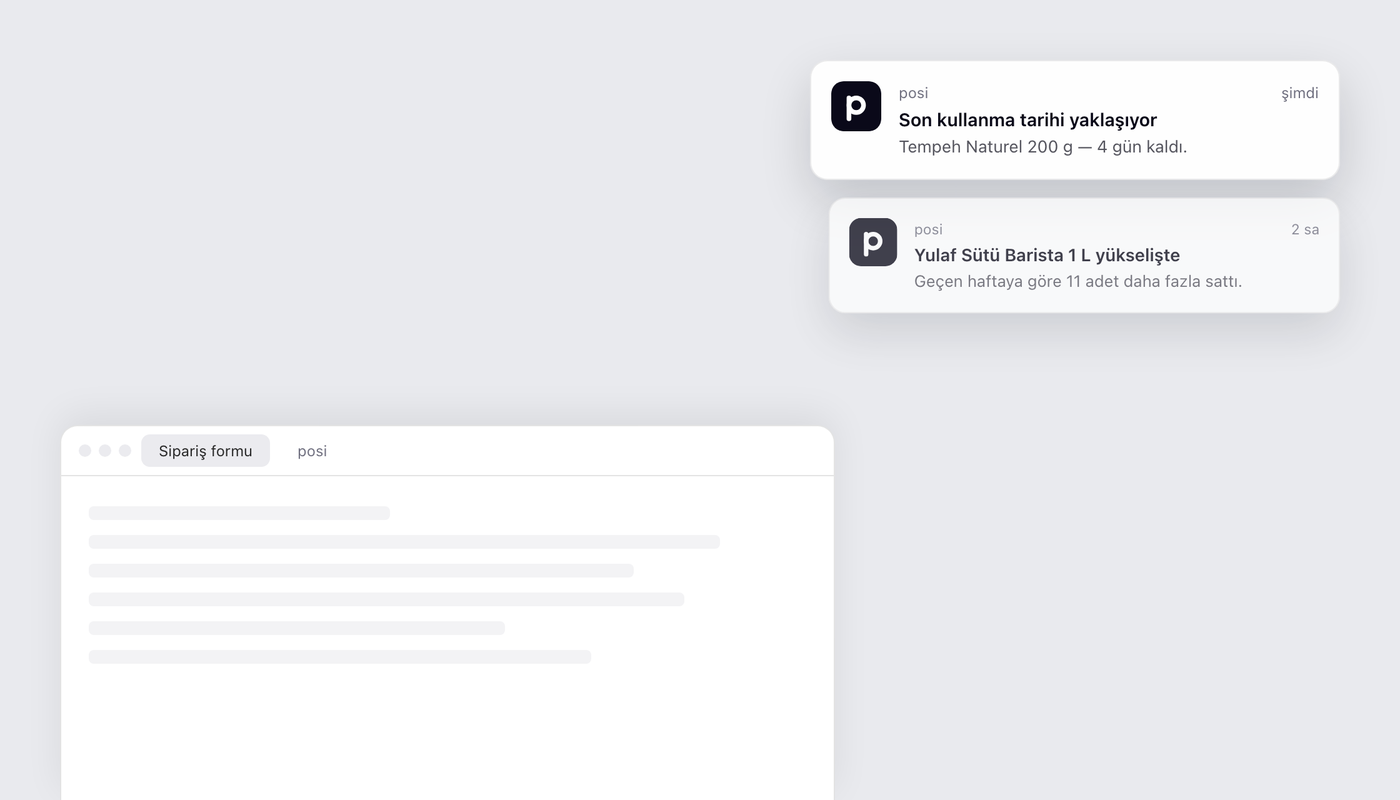
Cihaz bildirimleriDevice notifications
posi başka sekmedeyken bile bildirim ekranınıza düşer.notifications reach your screen even when posi is in another tab.
-
posi+
BBD/SKT hatırlatmalarıBest-before reminders
son kullanma tarihine 7 gün kala haber verir — ürün elde kalmadan.a heads-up 7 days before a batch expires — before it's stuck on the shelf.
-
herkese açıkeveryone
Barkod oluşturmaBarcode generation
barkodsuz ürüne tek dokunuşla geçerli bir EAN-13 kod.a valid EAN-13 code for an unbarcoded product, in one tap.
-
posi+
Trend içgörüleriTrend insights
artık yüzde değil adet söylüyor: "11 adet daha fazla sattınız".now in units, not percentages: "you sold 11 more".
1. raporlar sayfasını baştan yazdık1. we rebuilt the reports screen
eski Raporlar sayfası "bu hafta ne kadar sattım" sorusuna cevap veriyordu, fazlasına değil. yenisi dört rakamla açılıyor: ciro, kâr, satış adedi ve sepet ortalaması. her birinin altında geçen döneme göre değişim ve küçük bir çizgi grafik var, yani rakamın iyi mi kötü mü olduğunu ayrıca hesaplamanız gerekmiyor.the old Reports screen answered "how much did I sell this week", and not much more. the new one opens with four numbers: revenue, profit, sales count and average basket. each carries its change against the previous period and a small line chart, so you don't have to work out whether a number is good or bad yourself.
altındaki büyük grafik bu dönemi geçen dönemin üstüne koyuyor, üzerine de dönemin eğilim çizgisi çiziliyor — yön tek bakışta okunuyor. daha aşağıda en çok satanlar, ödeme dağılımı (nakit / kart / yemek kartı), en uzun süredir satılmayanlar ve en kârlı ürünler var. sonuncusunda küçük bir hesap makinesi duruyor: fiyatı %5, %10 ya da %20 artırsanız aynı satış hızıyla ne kadar fazla kâr kalırdı, onu gösteriyor.the big chart below lays this period over the last one, with a trend line across the current period so direction reads at a glance. further down: best sellers, the payment split (cash / card / meal card), longest without a sale, and top-margin products. that last one carries a small what-if: bump the price by 5%, 10% or 20% and it shows the extra profit you'd keep at the same rate of sale.
haftalık, aylık ya da belirli bir ay seçebilirsiniz. ücretsiz planda bu haftanın cirosu ve satış adedi görünür; tam raporlar posi+ ile gelir. yeni sayfa şu an sınırlı sayıda hesapta açık; kademeli olarak herkese açıyoruz. hesabınızda henüz görünmüyorsa sırada demektir.pick weekly, monthly or a specific month. the free plan shows this week's revenue and sales count; the full reports come with posi+. the new screen is live on a limited set of accounts for now, and we're opening it up in stages. if you don't see it yet, you're in the queue.
2. fiş yazdırma: ucuz bir USB termal yazıcı yeter2. receipt printing: a cheap USB thermal printer is enough
müşteri "fiş alabilir miyim" dediğinde artık cevabınız var. posi, USB ile bağlanan termal fiş yazıcılarıyla çalışıyor: ESC/POS, Star Line Mode ve StarPRNT dilleri, 58 / 70 / 80 mm kağıt. yani piyasadaki kutu yazıcıların büyük çoğunluğu. ayrı bir sürücü, ayrı bir program, ayrı bir kutu yok — yazıcı doğrudan tarayıcıya bağlanıyor.when a customer asks for a receipt, you now have an answer. posi works with USB thermal receipt printers: ESC/POS, Star Line Mode and StarPRNT, on 58 / 70 / 80 mm paper — which covers most of the boxes on the market. no driver, no separate program, no extra box: the printer connects straight to the browser.
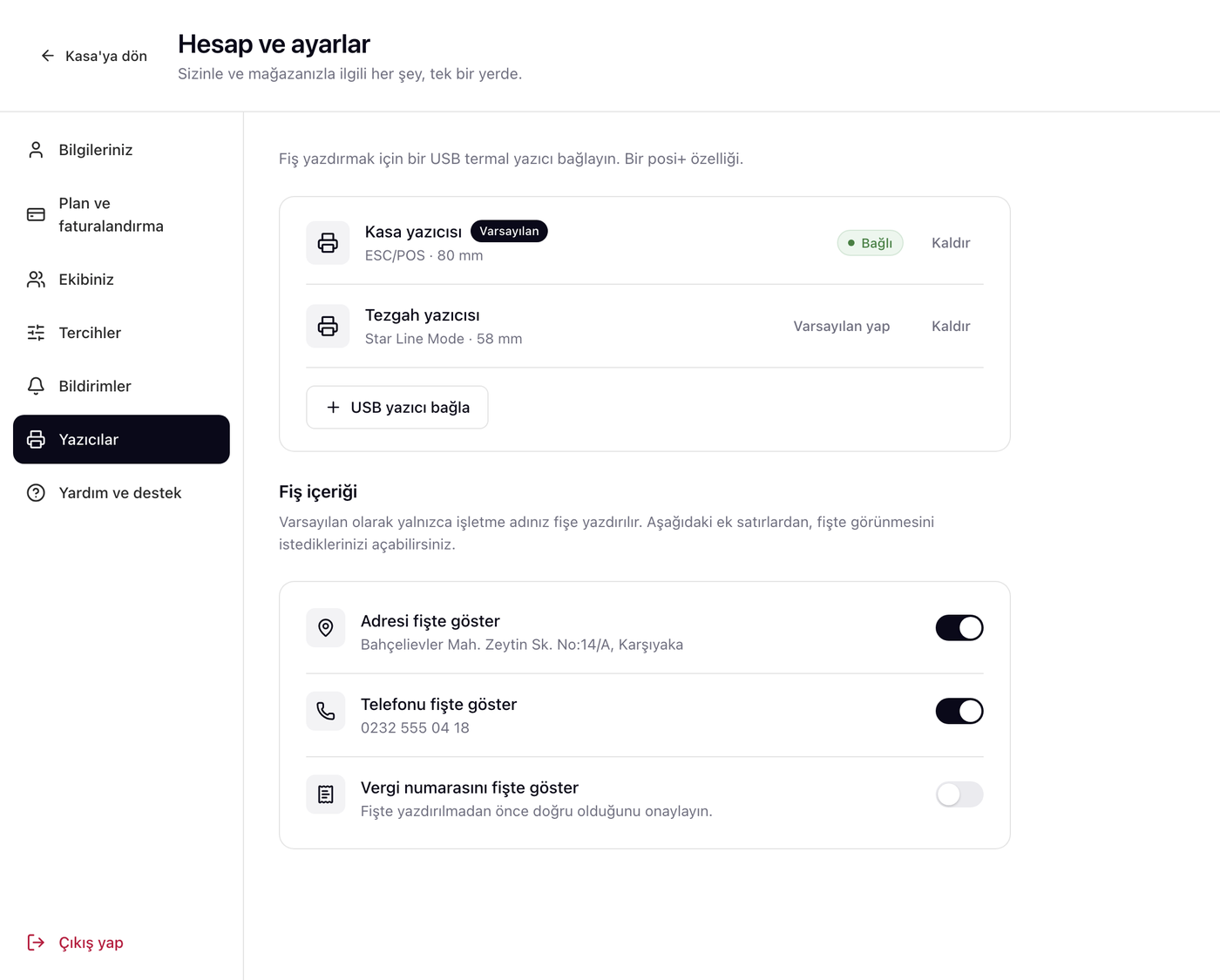
fiş yazdırmak için iki yer var: satış biter bitmez çıkan bildirimdeki Fiş yazdır düğmesi ve Satışlar geçmişindeki her satır — yani müşteri yarın geri gelip fiş isterse de yazdırabiliyorsunuz. WebUSB desteklemeyen tarayıcılarda "tarayıcıdan yazdır" seçeneği duruyor.there are two places to print from: the Print receipt button on the toast that appears the moment a sale completes, and every row in Sales history — so if a customer comes back tomorrow, you can still print it. browsers without WebUSB fall back to a plain "print via browser" option.
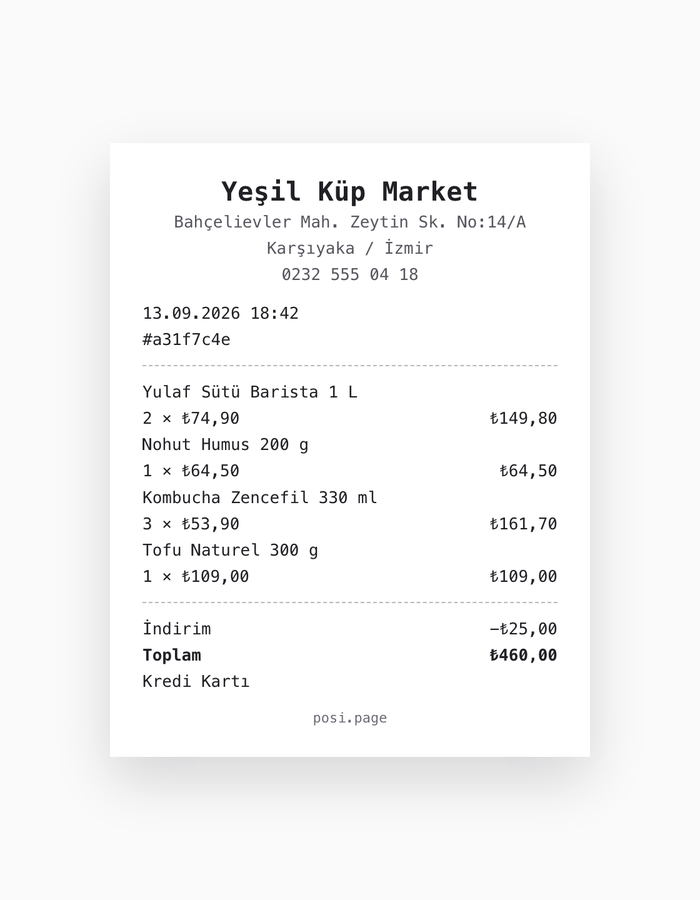
fiş yazdırma bir posi+ özelliği.receipt printing is a posi+ feature.
3. bildirimler artık uygulamanın dışına çıkıyor3. notifications now leave the app
uygulama içi bildirimleri birkaç ay önce eklemiştik; sorun şuydu ki bildirimi görmek için posi'nin açık sekmede olması gerekiyordu. artık öyle değil: izin verdiğinizde her bildirim, cihazınızın kendi bildirim olarak da görünüyor. posi arka sekmedeyken, simge durumundayken ya da telefon cebinizdeyken bile.we added in-app notifications a few months ago; the catch was that posi had to be the open tab for you to see one. not any more: once you allow it, every notification also shows up as your device's own. even when posi is in a background tab, minimised, or the phone is in your pocket.
platform platform nasıl çalıştığını açık yazalım, çünkü hepsi aynı değil:here's how it works platform by platform, plainly, because they aren't the same:
- Masaüstü — kurulum yok. Chrome, Edge, Firefox, Safari 16+ ve Opera'da doğrudan çalışır.Desktop — no install step. works directly in Chrome, Edge, Firefox, Safari 16+ and Opera.
- Android — kurulum yok. Chrome, Samsung Internet ve Firefox'ta sıradan bir sekmede çalışır.Android — no install step either. works in an ordinary tab in Chrome, Samsung Internet and Firefox.
- iPhone / iPad — iOS bildirimleri yalnızca Ana Ekrana eklenmiş web uygulamalarına veriyor. posi bunu size Paylaş › "Ana Ekrana Ekle" adımıyla anlatıyor, gösteremeyeceği bir izin penceresi açmak yerine.iPhone / iPad — iOS only gives notifications to a web app saved to the Home Screen. posi walks you through Share › "Add to Home Screen" instead of opening a permission prompt it couldn't show.
- Uygulama içi tarayıcılar — posi'yi WhatsApp, Instagram veya Facebook içindeki tarayıcıdan açtıysanız orada bildirim gösterilemez. posi bunu söylüyor ve gerçek tarayıcıda nasıl açacağınızı anlatıyor.In-app browsers — if you opened posi inside WhatsApp, Instagram or Facebook, notifications can't be shown there. posi says so, and explains how to reopen it in a real browser.
izin cihaz başına verilir: kasadaki bilgisayarda açıkken telefonunuzda kapalı olabilir, ikisi birbirini etkilemez.permission is per device: it can be on at the till and off on your phone — the two don't affect each other.
4. hangi bildirimi alacağınızı siz seçiyorsunuz4. you choose which notifications you get
bildirim eklemek kolay, insanı bıktırmamak zor. o yüzden Ayarlar › Bildirimler altında her tür için ayrı bir anahtar var — ve her birinin varsayılanını ayrı ayrı düşündük.adding notifications is easy; not wearing people out is the hard part. so Settings › Notifications has a switch per type — and we thought about each default separately.
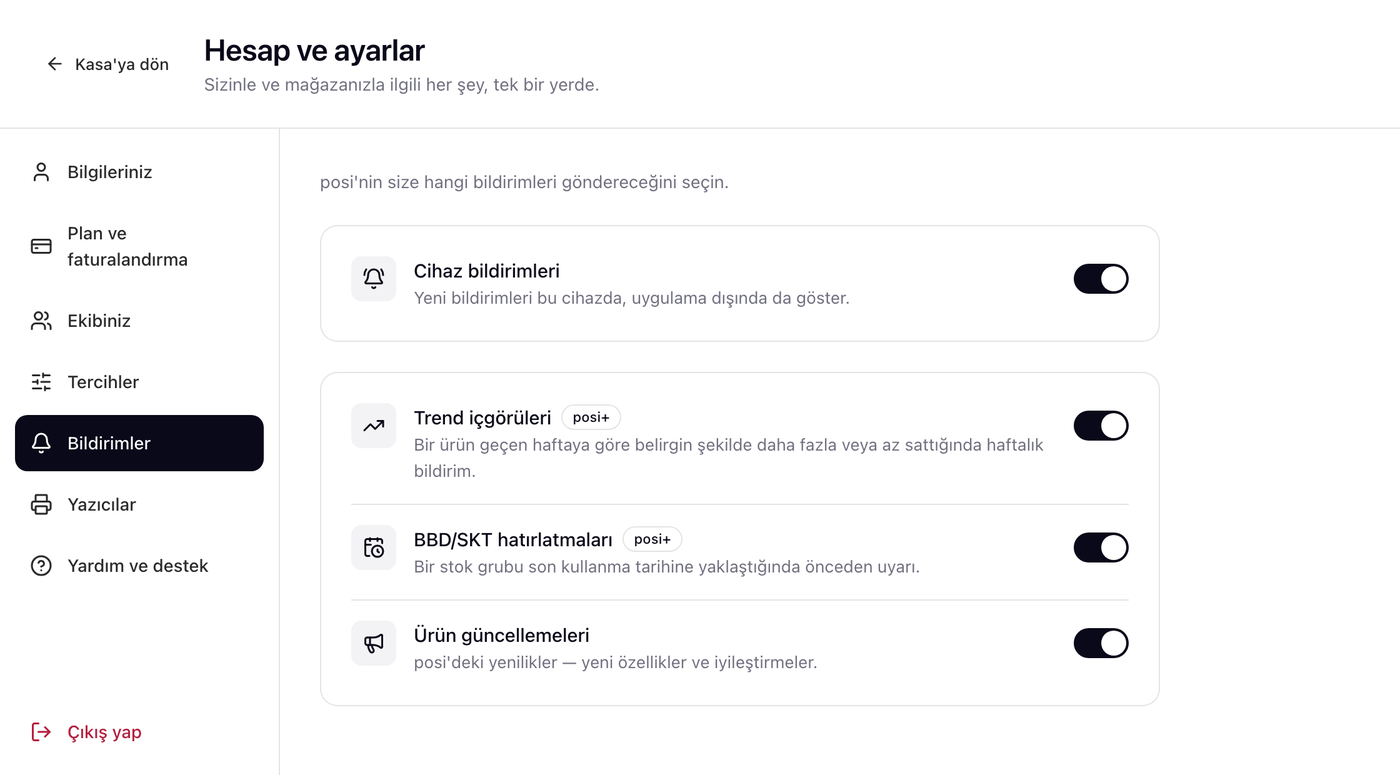
BBD/SKT hatırlatmalarıBest-before reminders
yeni bir bildirim türü: bir stok grubunun son kullanma tarihine 7 günden az kaldığında posi size haber veriyor — ürün elinizde kalmadan indirime çekebilesiniz diye. aynı ürün için bir kez uyarılıyorsunuz; ürünü yeniden stokladığınızda hatırlatma bir sonraki parti için tekrar kuruluyor. varsayılan olarak kapalı, çünkü herkesin envanterinde tarihli ürün olmuyor — açmak isterseniz Bildirimler'den açıyorsunuz. posi+ özelliği.a new notification type: when a stock batch is within 7 days of its best-before date, posi tells you — while there's still time to discount it. you're warned once per product; restocking it arms the reminder again for the next batch. it's off by default, since not every shop carries dated stock — turn it on under Notifications. a posi+ feature.
trend içgörüleri artık adet söylüyortrend insights now speak in units
haftalık trend bildirimleri eskiden "%500 daha fazla sattı" derdi. bu cümle hiçbir şey anlatmıyordu: iki adetten on iki adede çıkan bir ürün de %500 yapıyor. artık "bu ürünü geçen haftaya göre 11 adet daha fazla sattınız" diyor — yüzde değil, adet. eşik de yüzdeye değil gerçek adet farkına bakıyor, yani küçük sayılar gürültü üretmiyor.weekly trend notifications used to say "sold 500% more". that sentence told you nothing: two units becoming twelve is also 500%. now it reads "you sold 11 more of this product than last week" — units, not a percentage. the threshold looks at the real unit difference too, so small numbers stop generating noise.
5. barkodu olmayan ürüne barkod üretin5. generate a barcode for an unbarcoded product
kendi yaptığınız turşu, açık poşetlenen kuruyemiş, tezgahta tartılan ürün — barkodu yok, kasada aramakla vakit gidiyor. ürün formundaki barkod alanının yanına bir zar simgesi koyduk: dokunun, posi geçerli bir EAN-13 kod üretip alana yazsın. etiketini yazdırıp yapıştırın, artık okutulan bir ürün.your own pickles, loose nuts bagged in the back, something weighed at the counter — no barcode, and hunting for it at the till costs you time. we put a dice button next to the barcode field on the product form: tap it and posi generates a valid EAN-13 code into the field. print the label, stick it on, and it scans like anything else.
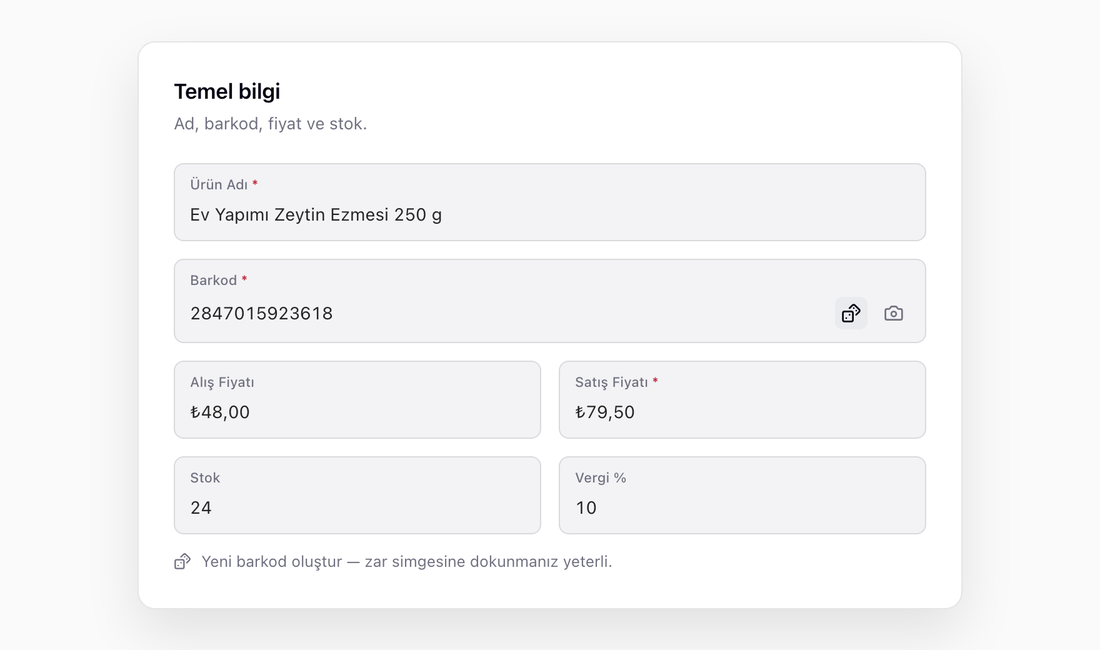
üretilen kodlar rastgele değil: GS1'in mağaza içi kullanıma ayırdığı 20–29 önek aralığından geliyorlar. bu aralık hiçbir üreticiye verilmez, dolayısıyla ürettiğiniz kod gerçek bir ürünün barkoduyla bugün de, beş yıl sonra da çakışamaz — kontrol ettiğimiz için değil, tanım gereği. kendi kataloğunuz içindeki benzersizlik de ayrıca kontrol ediliyor.the codes aren't just random: they come from GS1's restricted-circulation 20–29 prefix range. that range is never assigned to a manufacturer, so a code you generate can't collide with a real product's barcode today or in five years — by construction, not because we checked. uniqueness within your own catalogue is checked too.
bir de bunlarand a few smaller ones
- Barkod okutma hızlandı. El tarayıcısıyla arka arkaya okuturken satırlar arasında bekleme vardı; her okutma dört ayrı ağ isteği yapıyordu. Artık tek sorgu — ve alan Enter'a basar basmaz temizleniyor, yani hızlı okutmada kodlar birbirine yapışmıyor.Barcode scanning got faster. Scanning items back to back with a handheld used to stall between rows — each scan made four separate network round trips. It's one query now, and the field clears the moment you hit Enter, so fast scans no longer concatenate.
- Fişe e-posta satırı. Adres, telefon ve vergi numarasının yanına e-posta da eklendi. Bir alan boşsa, kendi fatura bilgilerinizden doldurulmuş bir öneri görürsünüz — kaydetmeden fişe geçmez.An email line on receipts. Alongside address, phone and tax number. When a field is empty, you get a suggestion pre-filled from your own billing details — nothing reaches the receipt until you save it.
- Raporlar telefonda da yenilendi. Yeni sayfa artık masaüstüne özel değil; telefonda da aynı ekranı görüyorsunuz.The new Reports screen works on phones. It isn't desktop-only any more — the same screen renders on a phone.
bu listedeki neredeyse her şey birinin bize yazmasıyla başladı. sırada ne olsun istiyorsanız yazın — [email protected]. okuyoruz.nearly everything on this list started with someone writing to us. tell us what you want next — [email protected]. we read them.
hepsi posi'de, açın bakın.it's all in posi — go have a look.
tarayıcıda açılır, kurulum yoktur. posi+ özelliklerini 7 gün ücretsiz deneyin — kart bilgisi istemeden.opens in your browser, nothing to install. try the posi+ features free for 7 days — no card needed.